API Specs & Data Structures
This page documents the core spec/data types used across the public API.
For task-oriented usage, see Common Workflows. For exact embedding, export, and inspect functions, see API: Embedding, API: Export, and API: Inspect.
Start with SpatialSpec (BBox or PointBuffer) to define the ROI.
Use TemporalSpec.year(...) for precomputed/year-indexed products and TemporalSpec.range(...) for provider/on-the-fly fetch windows.
Use OutputSpec.pooled() first unless you specifically need spatial structure (grid) or a model-specific spatial field.
Data Structures
SpatialSpec
SpatialSpec describes the spatial region for which you want to extract an embedding.
BBox
BBox(minlon: float, minlat: float, maxlon: float, maxlat: float, crs: str = "EPSG:4326")
This is an EPSG:4326 latitude/longitude bounding box. The current public API supports only EPSG:4326, and validate() checks that the bounds are valid.
PointBuffer
PointBuffer(lon: float, lat: float, buffer_m: float, crs: str = "EPSG:4326")
This is a square ROI centered at a point, with size defined in meters and internally projected into the coordinate system required by the provider. buffer_m must be greater than zero.
TemporalSpec
TemporalSpec describes the time range (by year or by date range).
TemporalSpec(mode: Literal["year", "range"], year: int | None, start: str | None, end: str | None)
Recommended constructors:
TemporalSpec.year(2022)
TemporalSpec.range("2022-06-01", "2022-09-01")
Temporal range is a window
TemporalSpec.range(start, end) is treated as a half-open interval [start, end), so end is excluded.
Temporal semantics in provider and on-the-fly paths: TemporalSpec.range(start, end) is interpreted as a half-open window [start, end), so end is excluded. In GEE-backed fetch paths, that window is used to filter an image collection and then apply a compositing reducer such as median or mosaic. The fetched input is therefore usually a composite over the whole window rather than an automatically selected single-day scene. If you want to approximate a single-day query, use a one-day window such as TemporalSpec.range("2022-06-01", "2022-06-02").
SensorSpec
SensorSpec is mainly for on-the-fly models (fetch a patch from GEE online and feed it into the model). It specifies which collection to pull from, which bands, and what resolution/compositing strategy to use.
SensorSpec(
    collection: str,
    bands: Tuple[str, ...],
    scale_m: int = 10,
    cloudy_pct: int = 30,
    fill_value: float = 0.0,
    composite: Literal["median", "mosaic"] = "median",
    modality: Optional[str] = None,
    orbit: Optional[str] = None,
    use_float_linear: bool = True,
    s1_require_iw: bool = True,
    s1_relax_iw_on_empty: bool = True,
    check_input: bool = False,
    check_raise: bool = True,
    check_save_dir: Optional[str] = None,
)
| Field | Meaning |
|---|---|
collection |
GEE collection or image ID. |
bands |
Band names as a tuple. |
scale_m |
Sampling resolution in meters. |
cloudy_pct |
Best-effort cloud filter, subject to collection properties. |
fill_value |
No-data fill value. |
composite |
Temporal compositing method, usually median or mosaic. |
modality |
Optional model-facing modality selector for models with multiple branches. |
orbit |
Optional orbit or pass filter for sensor families that support it. |
use_float_linear |
Selects linear-scale floating-point products when a sensor family offers both linear and dB variants. |
s1_require_iw |
Prefer Sentinel-1 IW scenes only on provider-backed S1 fetch paths. |
s1_relax_iw_on_empty |
Retry without the IW filter when strict S1 IW fetch returns no imagery. |
check_* |
Optional input checks and quicklook saving; see API: Inspect. |
Note
For precomputed models (e.g., directly reading offline embedding products), sensor is usually ignored or set to None.
Note
Public embedding/export APIs also accept a top-level modality=... convenience argument.
When provided, rs-embed resolves it into the model's sensor/input contract and validates that the model explicitly supports that modality.
FetchSpec
FetchSpec is the lightweight public override for sampling / fetch policy.
Use it when you want to change common knobs such as resolution or compositing, but do not want to define a full SensorSpec.
FetchSpec(
    scale_m: int | None = None,
    cloudy_pct: int | None = None,
    fill_value: float | None = None,
    composite: Literal["median", "mosaic"] | None = None,
)
| Field | Meaning |
|---|---|
scale_m |
Sampling resolution override. |
cloudy_pct |
Cloud filter override. |
fill_value |
No-data fill override. |
composite |
Temporal compositing override. |
Recommended rule: use fetch=FetchSpec(...) for normal public API usage. Use sensor=SensorSpec(...) only when you need advanced control over collection, bands, modality, or similar source-level details.
Important constraints: fetch and sensor cannot be passed together in the same request, and fetch is always applied on top of the model's default sensor contract. Some models use scale_m as more than fetch resolution: for example, scalemae uses it as semantic scale conditioning, and anysat uses it as both fetch resolution and patch-size control.
Example:
from rs_embed import FetchSpec, get_embedding

emb = get_embedding(
    "prithvi",
    spatial=...,
    temporal=...,
    fetch=FetchSpec(scale_m=10, cloudy_pct=10),
)
OutputSpec
OutputSpec controls the embedding output shape: a pooled vector or a dense grid.
OutputSpec(
    mode: Literal["grid", "pooled"],
    pooling: Literal["mean", "max"] = "mean",
    grid_orientation: Literal["north_up", "native"] = "north_up",
)
Recommended Constructors
OutputSpec.pooled(pooling="mean") # shape: (D,)
OutputSpec.grid()         # shape: (D, H, W), normalized to north-up when possible
OutputSpec.grid(grid_orientation="native")  # keep model/provider native orientation
Sampling resolution is no longer configured on OutputSpec.
Use fetch=FetchSpec(scale_m=...) for resolution overrides.
pooled
ROI-level Vector Embedding
pooled represents one whole ROI (Region of Interest) using a single vector (D,).
Best suited for classification, retrieval, clustering, and most cross-model comparison work. It is usually recommended because it is easier to compare across models and much smaller to store and pass downstream, not because it is always dramatically faster than grid. The out put shape is:
Embedding.data.shape == (D,)
How pooled is produced:
- ViT / MAE-style models (e.g., RemoteCLIP / Prithvi / SatMAE / ScaleMAE)
Start from patch tokens
(N, D)with an optional CLS token. The adapter removes the CLS token if present, then pools across the token axis, usually withmeanand optionally withmax.
Mean-pooling formula:
- Precomputed embeddings (e.g., Tessera / GSE / Copernicus)
These already expose an embedding grid
(D, H, W), so pooling happens over the spatial dimensions(H, W).
grid
ROI-level Spatial Embedding Field
grid returns a spatial embedding field (D, H, W), where each spatial location maps to a vector.
Best suited for spatial visualization, pixel-wise or patch-wise tasks, and intra-ROI structure analysis. For many token-based models, the backbone forward cost is similar to pooled, and the main difference is output reconstruction, memory footprint, and downstream handling. The output shape is:
Embedding.data.shape == (D, H, W)
Note
data can be returned as xarray.DataArray, with metadata in meta or attrs. For precomputed geospatial products, that metadata may include CRS and crop context. For ViT token grids, it usually describes patch-grid structure rather than georeferenced pixel coordinates.
How grid is produced:
-
ViT / MAE-style models Start from tokens
(N, D). The adapter removes a CLS token if needed, reshapes the remaining tokens from(N', D)to(H, W, D), and then reorders them to(D, H, W). Here(H, W)comes from the patch layout, such as8x8or14x14. -
Precomputed embeddings These already use
(D, H, W)as the native output shape, so the API can return that structure directly.
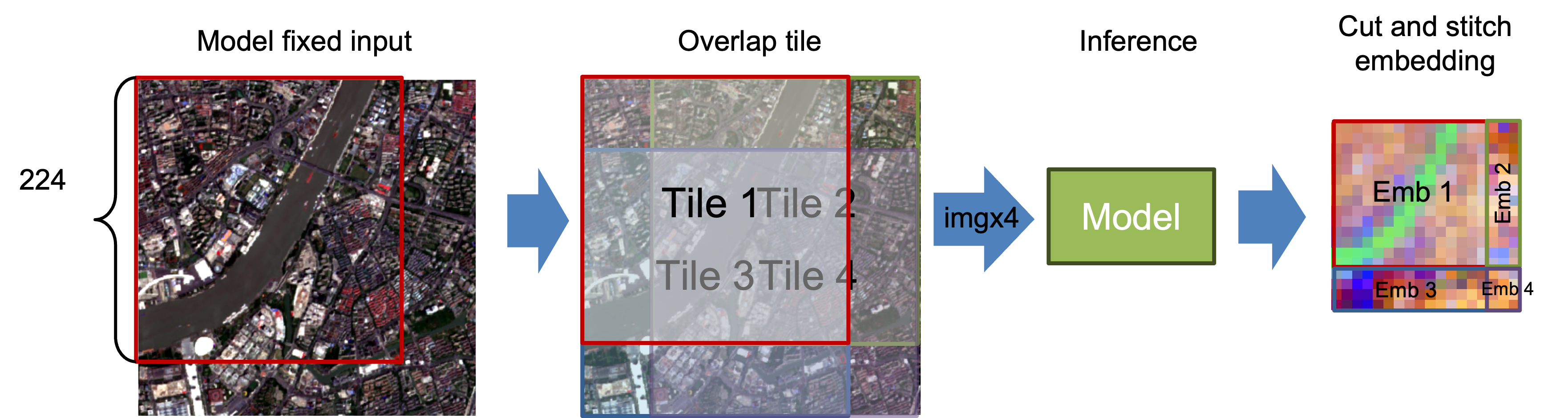
InputPrepSpec
Optional Large-ROI Input Policy
InputPrepSpec controls API-level handling of large on-the-fly inputs before model inference.
This is mainly useful when you want to choose between the model's normal resize path and API-side tiled inference.
InputPrepSpec(
    mode: Literal["resize", "tile", "auto"] = "resize",
    tile_size: Optional[int] = None,
    tile_stride: Optional[int] = None,
    max_tiles: int = 9,
    pad_edges: bool = True,
)
Recommended Constructors
InputPrepSpec.resize()               # default behavior (fastest)
InputPrepSpec.tile()                 # tile size inferred from model defaults.image_size when available
InputPrepSpec.auto(max_tiles=4)      # choose tile or resize automatically
InputPrepSpec.tile(tile_size=224)    # explicit tile size override
String Shorthand
input_prep="resize"   # default
input_prep="tile"
input_prep="auto"
Current Tiling Behavior
Tile size defaults to embedder.describe()["defaults"]["image_size"] when available, unless you override it. Boundary tiles use a cover-shift layout such as 300 -> [0,224] and [76,300] to avoid edge padding when possible, and grid stitching uses midpoint-cut ownership in overlap regions rather than hard overwrite. tile_stride currently must equal tile_size, so explicit overlap or gap control is not enabled yet, although boundary shifting can still create overlap on the last tile. auto is conservative and currently prefers tiling mainly for OutputSpec.grid() when tile count is small enough.
ExportTarget / ExportConfig / ExportModelRequest
export_batch(...) now uses small public request objects so large export jobs do not need dozens of top-level keywords.
Examples
ExportTarget.combined("exports/run")
ExportTarget.per_item("exports/items", names=["p1", "p2"])

ExportConfig(
    save_inputs=True,
    save_embeddings=True,
    chunk_size=32,
    num_workers=8,
    resume=True,
)

ExportModelRequest("remoteclip")
ExportModelRequest("terrafm", modality="s1", sensor=my_s1_sensor)
ExportModelRequest.configure("thor", variant="large")
ExportTarget controls where outputs are written, ExportConfig controls how the export runs, and ExportModelRequest carries optional per-model overrides when one job mixes different settings such as sensor, modality, or variant. Use ExportModelRequest.configure(...) when you want to pass model settings as keyword arguments.
Legacy out + layout, out_dir / out_path, and per-model dict overrides are still accepted for backward compatibility.
Embedding
get_embedding, get_embeddings_batch, Model.get_embedding, and Model.get_embeddings_batch all return Embedding.
from rs_embed.core.embedding import Embedding

Embedding(
    data: np.ndarray | xarray.DataArray,
    meta: Dict[str, Any],
)
data holds the embedding itself as a float32 vector or grid. meta is the runtime metadata attached to that result.
This is the main metadata users should inspect across the public embedding APIs. Export APIs do not redefine it; they only serialize the same embedding metadata into the manifest.
What Embedding.meta is for
Embedding.meta answers questions such as:
- Which model produced this embedding
- Which backend, sensor, and temporal request were actually used
- Whether the output is pooled or grid-like, and how pooling or grid layout should be interpreted
- Whether any API-side preprocessing such as tiling was applied
- Which model-specific runtime details matter for interpreting the output
Stable Contract Fields
All built-in embedders now share the same minimum Embedding.meta contract. These fields should always be present, even when a specific model has little to say for one of them:
| Field | Meaning |
|---|---|
model |
Model identifier that produced the embedding. |
type |
Execution family such as precomputed or on_the_fly. |
backend |
Backend used at runtime, such as auto or gee. |
source |
Source dataset, collection, or checkpoint family used by the embedder. |
sensor |
Effective sensor metadata attached to the returned embedding. |
temporal |
Serialized temporal request as interpreted by the embedder. |
image_size |
Model input image size when the embedder records it. |
pooling |
Pooling semantics for pooled outputs, such as token_mean, patch_mean, or mean_hw. |
grid_hw |
Grid height and width for grid outputs in model feature space. |
cls_removed |
Whether a CLS token was removed before pooling or grid reshaping. |
input_prep |
API-side input preprocessing metadata, for example whether the request resolved to resize, tile, or auto -> tile. |
Model-specific adapters can still attach additional keys beyond this stable base, such as checkpoint IDs, normalization details, token counts, frame counts, CRS hints, crop provenance, or modality-specific runtime flags.
Example
from rs_embed import FetchSpec, PointBuffer, TemporalSpec, get_embedding

emb = get_embedding(
    "remoteclip",
    spatial=PointBuffer(lon=121.5, lat=31.2, buffer_m=2048),
    temporal=TemporalSpec.range("2022-06-01", "2022-09-01"),
    fetch=FetchSpec(scale_m=10),
)

print(emb.data.shape)
print(emb.meta["model"])
print(emb.meta.get("sensor"))
Embedding.meta vs describe_model() / Model.describe()
These two metadata surfaces are related, but they serve different purposes:
| Surface | When you read it | What it means |
|---|---|---|
Embedding.meta |
After inference | Runtime result metadata for one concrete output |
describe_model(model) |
Before inference | Static capability metadata for a model class |
Model.describe() |
After constructing Model(...), before or after inference |
The same capability metadata, accessed from the model instance |
Use Embedding.meta when you want to interpret a returned embedding.
Use describe_model() or Model.describe() when you want to inspect what a model supports before you run it, such as supported outputs, default inputs, modality branches, or model-specific keyword arguments.
describe_model() / Model.describe()
describe_model(model_id) calls the embedder's describe() implementation without running inference or loading model weights. Model.describe() exposes the same capability dictionary on the class-based API.
A typical describe() result contains fields such as:
| Field | Meaning |
|---|---|
type |
Whether the model is precomputed or on_the_fly. |
backend |
Supported backends or backend family. |
inputs |
Default provider-facing input contract, often collection and bands. |
temporal |
Supported temporal mode such as year or range. |
output |
Supported output modes such as pooled and grid. |
defaults |
Default runtime knobs such as scale_m, cloudy_pct, composite, or image_size. |
modalities |
Optional modality-specific branches for multi-branch models. |
model_config |
Machine-readable schema for supported model-specific kwargs such as variant. |
Example:
from rs_embed import Model, describe_model

desc = describe_model("remoteclip")
print(desc["output"])
print(desc["defaults"]["image_size"])

model = Model("remoteclip")
print(model.describe()["type"])
Simple rule:
describe_model()tells you what a model can doEmbedding.metatells you what happened in this particular run